
Last Updated on October 11, 2026
If you’ve just bought an ANCEL AD310 scanner, getting started is easier than you might expect. You don’t need a smartphone, an app, or any previous experience with diagnostic tools. Simply connect the scanner to your car’s OBD2 port, turn on the ignition, and follow the menu on its screen.
In this Ancel AD310 how to use guide, I’ll walk you through connecting the scanner, reading trouble codes, checking live engine data, and clearing the Check Engine Light after repairs. We’ll also cover the features it doesn’t support and what to do if the scanner won’t connect to your vehicle.
The ANCEL AD310 is designed for basic engine and emissions diagnostics. If you’re still deciding whether it’s the right tool, read our detailed ANCEL AD310 scanner review for a closer look at its performance and features.
Ancel AD310 OBD2 Scanner: Quick Specifications
Before using the scanner, here’s a quick overview of what it offers.
| Feature | ANCEL AD310 |
|---|---|
| Display | 128 × 64 backlit LCD |
| Power Source | Vehicle’s OBD2 port |
| Connection | Wired 16-pin OBD2 connector |
| Read Engine Codes | Yes |
| Erase Engine Codes | Yes |
| Live Engine Data | Yes, supported PIDs |
| Freeze-Frame Data | Yes, when available |
| I/M Readiness | Yes |
| Vehicle Information | Yes, when supported |
| ABS and Airbag Diagnostics | No |
| Transmission-Specific Codes | Not supported |
| Bidirectional Testing | No |
The scanner works with many OBD2-compliant vehicles, including most 1996-and-newer U.S. vehicles, many 2000-and-newer European vehicles, and many 2005-and-newer Asian vehicles. Compatibility depends on the vehicle’s diagnostic protocol and market specification.
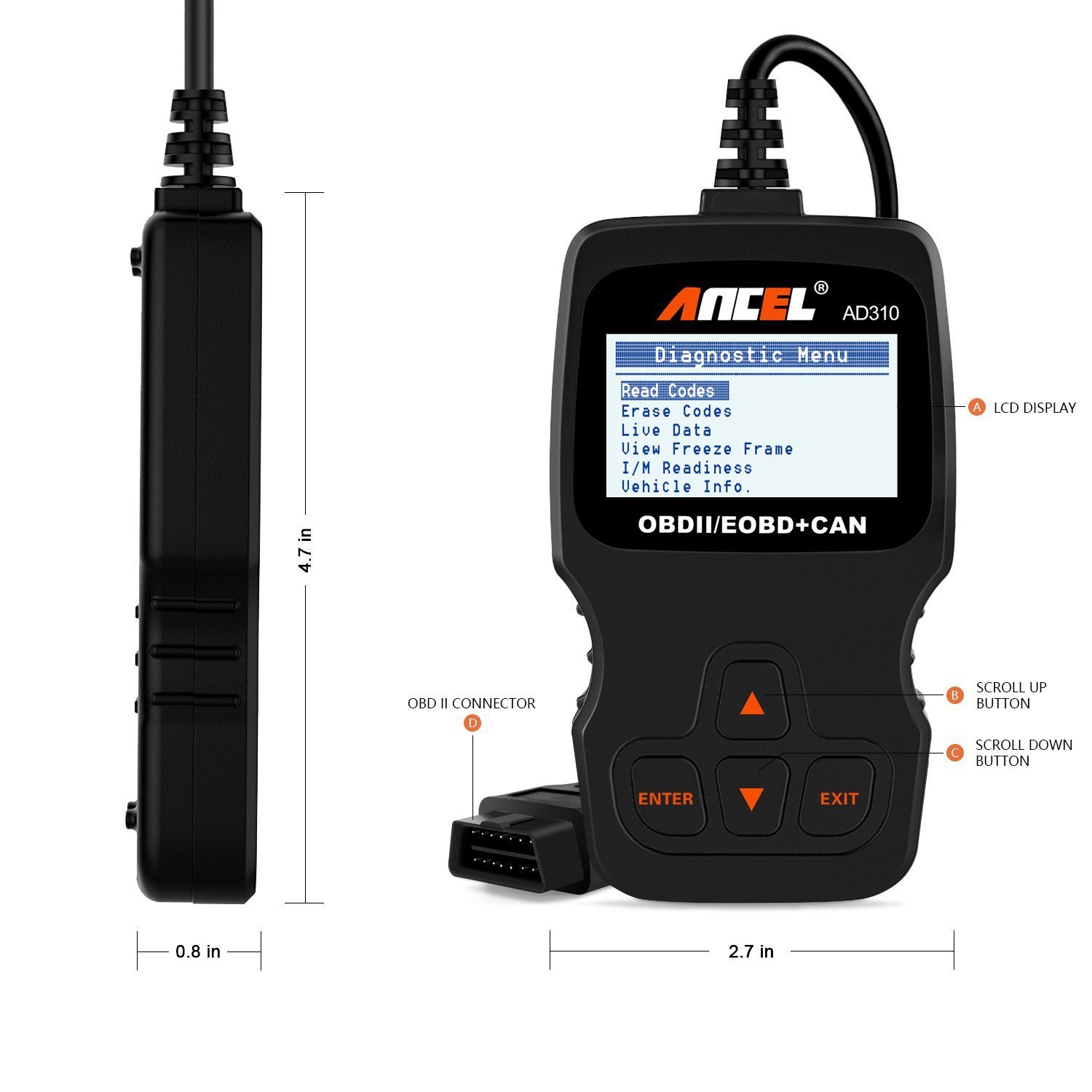 Check Today’s Price
How to Use the Ancel AD310 OBD2 Scanner: Step by Step
Using the ANCEL AD310 OBD2 scanner takes only a few steps. Park your car safely before starting, and keep the engine off while connecting the tool.
Step 1: Locate Your Vehicle’s OBD2 Port
Find the 16-pin OBD2 diagnostic connector. On most vehicles, it’s underneath the dashboard on the driver’s side, usually near the steering column.
If you can’t find it, check your owner’s manual. Some vehicles have a protective cover over the connector.
Step 2: Connect the ANCEL AD310
With the ignition switched off, plug the scanner’s connector into the OBD2 port.
The AD310 draws power directly from the vehicle, so you don’t need to install batteries or charge the scanner.
Make sure the connector is fully seated without forcing it.
Step 3: Turn the Ignition On
Turn the ignition to the ON position without starting the engine.
For vehicles with a push-button starter, follow the owner’s manual to enter ignition-on mode without starting the engine.
The scanner should power up and display its menu. Allow it to establish communication with the vehicle.
Step 4: Read Diagnostic Trouble Codes
Use the UP and DOWN buttons to navigate to the diagnostic menu. Choose Read Codes and press ENTER.
Depending on the vehicle, the scanner can retrieve stored and pending powertrain trouble codes. It may also provide code descriptions.
For example, a code such as P0301 indicates a cylinder 1 misfire. The code tells you which problem the computer detected, but it doesn’t always identify the failed part.
Write down the exact trouble code before making repairs. You can also use our OBD2 trouble code reference to understand what the code means.
Step 5: Check Live Engine Data
Return to the diagnostic menu and select Live Data.
The scanner can display available engine parameters, including:
- Engine RPM
- Engine coolant temperature
- Vehicle speed
- Fuel system status
- Short-term and long-term fuel trims
- Other supported sensor readings
Select View All Items to see the available data. Some firmware versions also offer a graphical data view.
Not every vehicle supports every parameter. For meaningful readings, some tests require the engine to be running and at operating temperature.
Don’t try to operate the scanner while driving. Have a passenger monitor the readings or perform the checks safely while parked.
Step 6: View Freeze-Frame Data
Select View Freeze Frame from the diagnostic menu.
Freeze-frame data records a snapshot of selected engine conditions when an emissions-related fault was detected. Depending on the vehicle, this may include RPM, engine load, coolant temperature, and fuel system information.
This feature can help you understand when the problem occurred. For example, a fault recorded during a cold start may require different checks than one that appeared under heavy acceleration.
Not every trouble code has freeze-frame data available.
Step 7: Check I/M Readiness
Select I/M Readiness to check emissions monitor status.
The scanner may show monitors as Ready, Not Ready, or Not Supported.
This feature is especially useful before an emissions inspection. A monitor marked Not Ready usually means the vehicle hasn’t completed the necessary self-tests.
Clearing trouble codes can reset readiness monitors, so don’t erase codes immediately before an emissions test.
How to Clear Codes With the ANCEL AD310
Once you’ve diagnosed and repaired the underlying problem, you can use the AD310 to erase stored emissions-related trouble codes.
- Connect the scanner and switch the ignition ON with the engine OFF.
- Open the diagnostic menu.
- Select Erase Codes.
- Read the confirmation message.
- Select YES and press ENTER to confirm.
- Allow the scanner to finish, then check for returning codes.
Important: Erasing codes does not repair the problem. If the fault is still present, the Check Engine Light may return.
Clearing codes may also erase freeze-frame information and reset emissions readiness monitors. Always record diagnostic information before using this feature.
What Can the ANCEL AD310 Actually Diagnose?
The AD310 is a practical tool for basic OBD2 powertrain diagnostics. It can help identify why the Check Engine Light is illuminated and display engine data useful during troubleshooting.
What It Can Do
- Read generic emissions-related powertrain codes.
- Display available trouble code descriptions.
- Read pending and stored codes.
- Erase supported engine trouble codes after repairs.
- Display live OBD2 sensor information.
- Retrieve freeze-frame data when available.
- Check emissions readiness status.
- Retrieve supported vehicle identification information.
What It Cannot Do
- Diagnose ABS-specific trouble codes.
- Read airbag or SRS system faults.
- Access transmission control modules for transmission-specific diagnostics.
- Perform advanced bidirectional component testing.
- Program keys or electronic control modules.
- Perform specialized service resets such as electronic parking brake maintenance.
If you need more than basic engine diagnostics, compare the ANCEL AD310, AD410, and AD530 to see which model’s supported features better match your needs.
Common ANCEL AD310 Problems and How to Fix Them
Most connection problems are straightforward to investigate. Before assuming your scanner is defective, try these checks.
| Problem | What to Check |
|---|---|
| Scanner won’t turn on | Check the OBD2 connection, vehicle battery, and diagnostic port fuse. |
| Linking error | Confirm OBD2 compatibility, switch the ignition ON, and reconnect the tool. |
| No trouble codes found | Check for pending codes and confirm you’re diagnosing the engine system rather than ABS or SRS. |
| Erase codes failed | Use ignition ON, engine OFF, and check whether an active fault remains. |
| Live data unavailable | Confirm communication and whether the vehicle supports the selected parameter. |
| Check Engine Light returns | Retrieve the codes again and repair the underlying fault. |
If the AD310 doesn’t power on in any compatible vehicle, inspect the cable and connector for damage. Persistent communication problems may require a different scan tool or professional diagnosis.
ANCEL AD310 Pros and Cons
Advantages
- Simple four-button interface suitable for beginners.
- No batteries, smartphone, or app required.
- Reads and clears basic engine trouble codes.
- Provides live engine data and freeze-frame information.
- Compact design that’s easy to keep in your vehicle.
- Useful emissions readiness feature.
Disadvantages
- No ABS, airbag, or transmission-specific diagnostics.
- Basic monochrome display.
- No advanced service resets or bidirectional tests.
- Vehicle and live-data coverage varies.
- Less convenient for advanced diagnostics than professional scanners.
ANCEL AD310 vs. FOXWELL NT301 vs. Innova 5610
All three scanners can help with engine diagnostics, but they target different users. Here’s a practical comparison.
| Feature | ANCEL AD310 | FOXWELL NT301 | Innova 5610 |
|---|---|---|---|
| Read Engine Codes | Yes | Yes | Yes |
| Live Engine Data | Yes | Yes | Yes |
| Freeze Frame | Yes | Yes | Yes |
| ABS/SRS Support | No | No | Supported on compatible vehicles |
| Bidirectional Testing | No | No | Selected functions on supported vehicles |
| Best For | Basic engine codes | Engine diagnostics with data graphing | Broader system diagnostics |
The AD310 is a sensible choice if you mainly want to retrieve engine codes and check basic data. The FOXWELL NT301 adds a different display and data presentation experience, while the Innova 5610 offers broader diagnostic capabilities on compatible vehicles.
For more information, read our FOXWELL NT301 review or Innova 5610 scanner review.
Frequently Asked Questions About the ANCEL AD310
1. How do I use the ANCEL AD310 for the first time?
Locate the vehicle’s OBD2 port, connect the scanner with the ignition off, and turn the ignition ON. Open the diagnostic menu and select Read Codes to retrieve stored or pending engine trouble codes.
2. Does the ANCEL AD310 work on all cars?
No. It supports many OBD2-compliant vehicles, including most 1996-and-newer U.S. vehicles, but compatibility varies by vehicle, market, and diagnostic protocol.
3. Can the ANCEL AD310 clear the Check Engine Light?
Yes. Select Erase Codes after repairing the problem. If the fault remains, the warning light may return. Erasing codes also resets certain emissions readiness information.
4. Can the ANCEL AD310 read live data?
Yes. It can display supported OBD2 parameters such as RPM, coolant temperature, vehicle speed, and fuel system information. The available data depends on the vehicle.
5. Does the ANCEL AD310 read ABS or transmission codes?
It does not support ABS, airbag, or transmission-module-specific diagnostics. It focuses on standard OBD2 engine and emissions-related powertrain information.
6. Why isn’t my ANCEL AD310 connecting to my car?
Check that the ignition is ON, the connector is fully inserted, and the vehicle supports OBD2 communication. Also inspect the diagnostic port fuse and cable. Some vehicles may not support the scanner’s available protocols.
Final Verdict: Is the ANCEL AD310 Right for You?
If you want an affordable way to read engine trouble codes, check basic sensor data, and understand why the Check Engine Light is on, the ANCEL AD310 is a practical choice.
Its biggest advantage is simplicity. You don’t need to install software or connect a smartphone to perform everyday OBD2 checks.
However, it’s not a replacement for a professional diagnostic scanner. If you frequently work on ABS, airbag, transmission, or advanced electronic systems, you’ll need a tool with broader vehicle coverage.
For beginners, learning how to use the ANCEL AD310 is a useful first step toward understanding vehicle problems before paying for repairs. Just remember that a trouble code identifies where diagnosis should begin, not necessarily which part needs replacing.
Kevin Nicholas is an automotive mechanic and editor of The Effective Guide. He writes about warning lights, car problems, and diagnostic tools, helping drivers understand what to check before replacing a part.