
Last Updated on October 17, 2026
Whether you’re looking for a simple DIY scan tool or a professional automotive diagnostic scanner, Autel is a brand worth considering. The company offers everything from basic code readers to advanced workshop equipment. Among its earlier high-end diagnostic tools, the Autel MaxiSys Elite became a popular choice for professional technicians.
The original MaxiSys Elite is an upgraded professional diagnostic platform from the earlier MaxiSys MS908P generation. It features a 1.8GHz NVIDIA Tegra 4 processor, a 9.7-inch touchscreen, wireless vehicle communication, and support for advanced diagnostic functions.
However, this is not the same scanner as the newer MaxiSys Elite II or Elite II Pro. Those models offer updated hardware and additional compatibility features.
In this Autel MaxiSys Elite review, we’ll examine the original scanner’s specifications, diagnostic capabilities, advantages, limitations, and how it compares with newer Autel tools in 2026.
Autel offers a wide selection of diagnostic products for different budgets. You can explore additional models in our Autel scanner comparison guide.
Autel MaxiSys Elite Technical Specifications
The original MaxiSys Elite was designed as a professional Android-based diagnostic tablet. Its hardware was powerful when introduced, although several components are now dated compared with current professional scanners.
The following specifications refer primarily to the original MaxiSys Elite platform. Battery capacity and onboard storage may differ between published hardware revisions.
| Feature | Original Autel MaxiSys Elite |
|---|---|
| Operating System | Android 4.4.4 KitKat |
| Processor | NVIDIA Tegra 4, 1.8GHz quad-core architecture |
| Memory | 2GB RAM; 32GB or 64GB storage depending on published version |
| Display | 9.7-inch capacitive touchscreen, 2048 × 1536 |
| Connectivity | Wi-Fi, Bluetooth 2.1, USB, Ethernet, HDMI, SD card |
| Camera | 8MP rear; 2MP front |
| Battery | Rechargeable lithium-polymer; verify capacity for specific revision |
| Tablet Dimensions | 309 × 225 × 35 mm |
| Tablet Weight | Approximately 1.59 kg (3.5 lb) |
| Diagnostics | Full-system scanning and supported enhanced diagnostics |
| Active Tests | Bi-directional functions on supported vehicles |
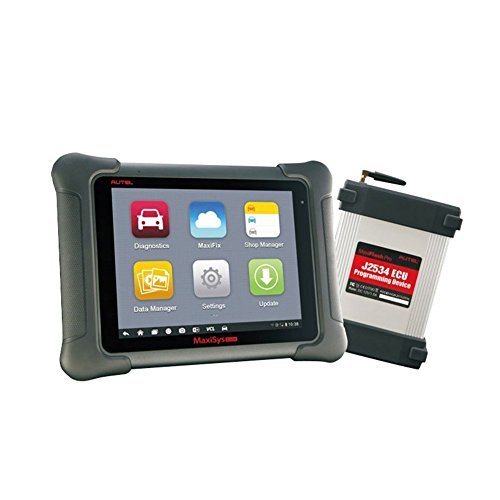
| Programming | J2534 pass-thru functionality with supported interface, software and OEM access |
| Vehicle Coverage | Broad US, Asian and European make coverage; exact functions vary |
| Software Updates | Availability and subscription eligibility must be confirmed |
| Price | 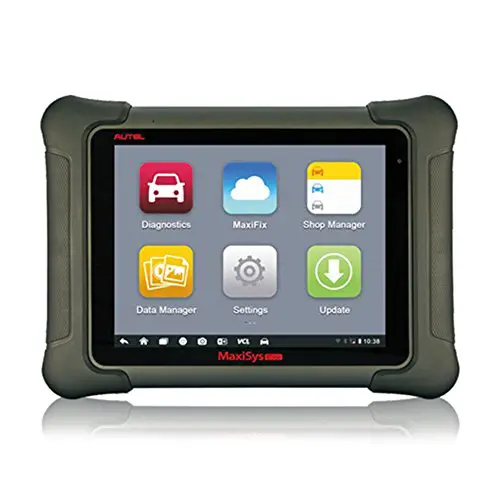 Check Today’s Price and Availability Check Today’s Price and Availability |
Key Features of the Autel MaxiSys Elite Scan Tool
The MaxiSys Elite was designed for professional diagnostics rather than basic check engine light reading. Its main appeal is the combination of comprehensive vehicle scanning, service functions, and supported ECU coding or programming capabilities.
- 9.7-inch high-resolution touchscreen.
- NVIDIA Tegra 4 processor operating at 1.8GHz.
- Wi-Fi and Bluetooth connectivity.
- All-system diagnostic scanning on supported vehicles.
- Live sensor data, graphing, and fault-code management.
- Bi-directional component testing when supported.
- Selected service resets and calibration procedures.
- J2534 vehicle programming interface functionality.
- Rugged housing designed for workshop use.
Feature availability depends on the installed software version, vehicle manufacturer, model year, and communication interface.
Why Use the Autel MaxiSys Elite Diagnostic Scanner?
The Autel MaxiSys Elite was developed to help mechanics diagnose several electronic systems using one tool.
Instead of relying on separate devices for basic engine codes and advanced module diagnostics, technicians can use the supported MaxiSys applications to access vehicle information, perform tests, and review repair-related data.
Considerate Design and Sturdy Construction
The MaxiSys Elite uses rubberized outer protection and a durable tablet housing intended for workshop environments.
Its relatively large screen makes diagnostic information easier to read, especially when examining live data graphs or multiple test results.
However, durable construction does not mean the tablet is waterproof or suitable for unrestricted exposure to liquids. Keep charging ports and connectors protected from moisture.
Portable and Smart
Despite its large screen, the scanner is portable enough to move between vehicles in a workshop.
The rechargeable battery allows technicians to review diagnostic information without depending continuously on external power.
Supported AutoVIN technology can also help identify vehicle information automatically, although manual identification may still be necessary in some cases.
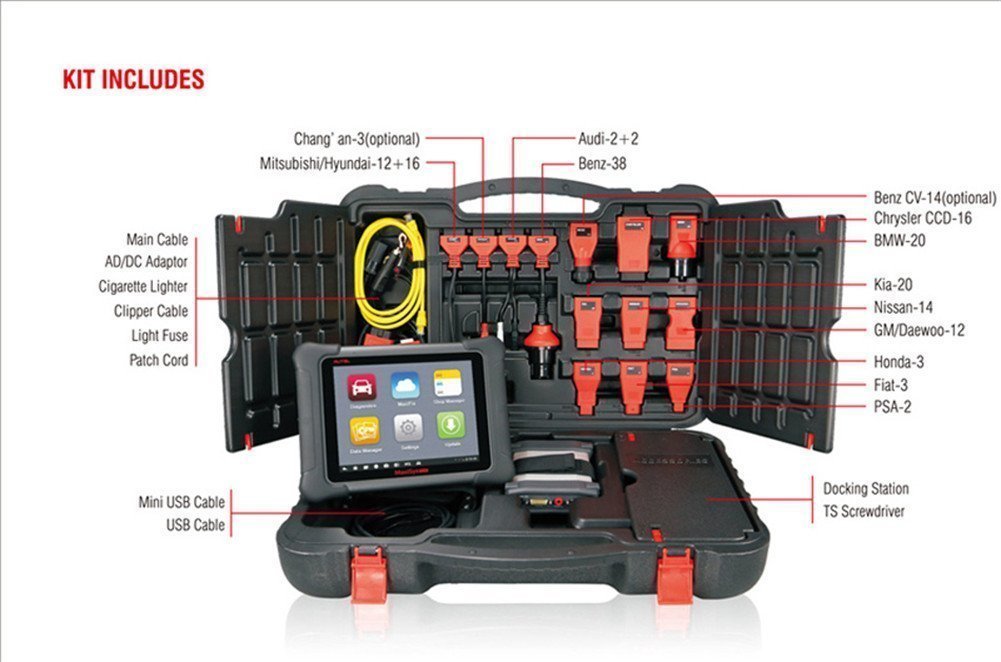 Check Autel MaxiSys Elite Kit Availability
Ergonomic Design
The rubberized housing provides a practical grip, while the touchscreen responds to ordinary workshop use.
The larger display is especially helpful for displaying diagnostic codes, wiring-related information, and sensor readings.
However, the tablet weighs approximately 3.5 pounds, so it is better described as a portable workshop tablet than a lightweight handheld scanner.
Fast Diagnostic Operation
The original MaxiSys Elite uses a 1.8GHz NVIDIA Tegra 4 processor with 2GB of RAM.
This combination was designed to provide responsive navigation and efficient diagnostic operation for its generation.
It can perform vehicle scans, retrieve fault codes, display supported live data, and manage diagnostic reports.
However, processing speed should not be judged by processor frequency alone. Modern scanners with newer operating systems and processors may be noticeably faster, particularly when handling complex diagnostic applications.
Wide Vehicle Coverage
Autel developed the original Elite platform for a broad range of domestic, Asian, and European vehicle makes.
Supported functions can include engine, transmission, ABS, SRS, and other onboard systems.
Still, broad vehicle coverage does not mean every function works on every vehicle.
Before buying, verify the specific make, model, year, engine, and function in Autel’s current compatibility information.
Technician Support and Diagnostic Records
The original MaxiSys platform includes workshop-oriented features for saving diagnostic records and managing vehicle information.
MaxiFix and interactive data logging were also promoted as resources for diagnostic assistance and technical communication.
Availability of these connected features may depend on current software support, account eligibility, and active services.
Software and System Updates
Software updates can improve diagnostic coverage and add supported functions to professional scanners.
The original MaxiSys Elite was offered with promotional update entitlements that varied by package and market.
For a scanner being purchased in 2026, do not assume that a historical free-update offer is still active.
Ask the seller to confirm the scanner’s registration status, current software version, renewal eligibility, and update cost before purchasing.
Advanced ECU Coding and Programming
One of the most important features of the Autel MaxiSys Elite is its support for advanced electronic control module functions.
Depending on the vehicle and software, available operations may include:
- Selected ECU coding and configuration.
- Supported J2534 pass-thru programming procedures.
- Steering angle sensor calibration.
- Electronic parking brake service functions.
- Throttle adaptation and relearn procedures.
- Injector coding on supported applications.
- Oil service and maintenance resets.
Important: ECU coding and ECU programming are not the same operation. Programming may require manufacturer subscriptions, approved software, stable external vehicle power, and the correct VCI hardware.
Some security-related functions also require authorized access. The original Elite should not be assumed to provide unrestricted programming on modern vehicles.
 View Product Details and Current Listing
Advantages of the Autel MaxiSys Elite
Even though this is an older professional diagnostic platform, it still has several strengths for users who need its supported functions.
- Comprehensive Diagnostics: Access to multiple vehicle systems rather than only generic OBD2 engine codes.
- Large Display: The 9.7-inch high-resolution screen provides room for detailed diagnostic information.
- Active Testing: Bi-directional controls help technicians investigate supported components.
- Programming Interface: J2534 functionality adds flexibility for certain professional tasks.
- Workshop Construction: Rubberized protection and a durable housing make it suitable for garage environments.
- Diagnostic Management: Vehicle records, reports, and supported assistance features can improve workshop organization.
Shortcomings of the Autel MaxiSys Elite Code Reader
No diagnostic scanner is perfect, and the original Elite has limitations that matter even more in 2026.
- Older Operating System: Android 4.4.4 is dated compared with modern diagnostic tablets.
- Limited Hardware by Current Standards: The original 2GB RAM configuration may feel slow during demanding operations.
- Update Costs: Software renewal may require an additional subscription, and eligibility should be confirmed.
- Compatibility Restrictions: Certain modern vehicle protocols or protected functions may require additional hardware or newer tools.
- Professional Learning Curve: Advanced programming and active tests require technical knowledge.
- Battery Aging: Used or refurbished units may have reduced battery capacity.
- Potentially High Ownership Cost: Software, accessories, replacement components, and subscriptions can increase expenses.
The biggest concern today is not that the original Elite was a poor scanner. Rather, newer vehicles increasingly require communication and security capabilities that may exceed what an older configuration can provide.
Autel MaxiSys Elite vs MaxiSys Ultra
The MaxiSys Ultra represents a more advanced generation of Autel diagnostic tablets, with newer hardware and a larger display.
Here is a comparison of the original MaxiSys Elite and the original MaxiSys Ultra—not every newer Ultra variant.
| Feature | MaxiSys Elite (Original) | MaxiSys Ultra (Original) |
|---|---|---|
| Processor | NVIDIA Tegra 4, 1.8GHz | Octa-core processor |
| Operating System | Android 4.4.4 | Android 7.0 |
| Memory | 2GB RAM; storage varies by revision | 4GB RAM / 256GB storage |
| Display | 9.7-inch, 2048 × 1536 | 12.9-inch, 2732 × 2048 |
| Rear Camera | 8MP | 16MP |
| Vehicle Interface | MaxiFlash Elite J2534 configuration | MaxiFlash VCMI multifunction interface |
| Advanced Diagnostics | Coding, active tests, supported programming | Advanced diagnostics, topology display and expanded measurement functions |
| Best Fit | Existing owners and supported older-vehicle work | Workshops needing more advanced diagnostic capabilities |
For a closer comparison of features, read our Autel MaxiSys Ultra review.
Original MaxiSys Elite vs MaxiSys Elite II Pro in 2026
If you’re shopping for a professional scanner today, the newer MaxiSys Elite II Pro deserves consideration alongside the original Elite.
According to Autel’s published Elite II Pro specifications, the newer scanner features:
- Android 10 operating system.
- Octa-core processor.
- 4GB RAM and 128GB onboard storage.
- 9.7-inch touchscreen with 2048 × 1536 resolution.
- Bluetooth 5.0 connectivity.
- 16MP rear camera.
- Updated vehicle communication hardware and diagnostic capabilities.
The newer model can be better suited to workshops that need expanded vehicle coverage, newer protocol support, and updated software.
However, even with a newer scanner, supported functions still depend on the vehicle, software subscription, and authorized access requirements.
Read our MaxiSys Elite II Pro review for a more detailed look at that model.
Is the Original Autel MaxiSys Elite Still Worth Buying in 2026?
The answer depends on the price, condition, software entitlement, and vehicles you intend to service.
It May Still Be Worth Considering If:
- You already own the scanner and it supports your regular repair work.
- You primarily diagnose older vehicles covered by its installed software.
- You can purchase a verified, fully functional unit at a reasonable price.
- You have confirmed that the required programming interface and accessories are included.
A Newer Scanner May Be Better If:
- You work on recent vehicles requiring updated network protocols.
- You need newer manufacturer-specific service functions.
- You want a more current operating system and faster tablet hardware.
- You require regularly updated professional software.
- You need supported access to security-protected diagnostic operations.
For professional shops, total ownership cost matters more than the initial purchase price alone. Consider software renewals, vehicle coverage, repair support, VCI compatibility, and the manufacturer’s current update policy.
What to Check Before Buying a Used MaxiSys Elite
Because the original MaxiSys Elite is an older scanner, a used purchase deserves careful inspection.
- Verify the exact model: Confirm whether the listing is for the original Elite, Elite II, or Elite II Pro.
- Check registration: Ask whether the tool is already registered and whether the account can be transferred where applicable.
- Confirm software status: Review the installed vehicle coverage and available updates.
- Inspect the battery: Make sure it charges and operates reliably.
- Check the VCI: Confirm the included interface connects and communicates properly.
- Inspect accessories: Verify that the charger, cables, and required adapters are included.
- Test your vehicles: If possible, demonstrate the exact diagnostic functions you need before purchasing.
An inexpensive tablet without compatible diagnostic software or a functioning VCI may cost more to restore than expected.
Frequently Asked Questions
1. What makes the Autel MaxiSys Elite different from basic OBD2 scanners?
The original MaxiSys Elite supports enhanced system diagnostics, live data, active tests, and selected coding or programming functions. Basic OBD2 code readers generally focus on emissions-related engine diagnostics.
2. Is the original MaxiSys Elite compatible with every vehicle?
No. It supports many US, Asian, and European makes, but diagnostic capabilities differ by model and year. Always verify coverage for the exact vehicle and required function.
3. Can the Autel MaxiSys Elite perform ECU coding?
Yes, on supported vehicles and systems. ECU programming may also be possible with the correct J2534 interface, OEM software, subscription, and approved procedure.
4. Does the MaxiSys Elite require software updates?
Software updates can improve compatibility and diagnostic coverage. For an original Elite being used in 2026, confirm current update availability and subscription eligibility with Autel or an authorized seller.
5. What is the battery life of the Autel MaxiSys Elite?
Runtime depends on the hardware revision, battery condition, screen use, and diagnostic activity. Used units may have reduced capacity, so test battery performance rather than relying on an advertised runtime.
6. Is the MaxiSys Elite II Pro the same as the original Elite?
No. The Elite II Pro is a newer model with updated processing hardware, Android 10, more memory, and newer communication capabilities.
7. Can the original MaxiSys Elite support CAN-FD and DoIP vehicles?
Support depends on the interface hardware, adapters, software version, and vehicle. Do not assume a standard original Elite package has full support for every newer protocol.
8. Is the original MaxiSys Elite a good purchase in 2026?
It may be suitable for existing owners or workshops servicing supported vehicles. For a new professional purchase, comparing the total cost and capabilities of newer scanners is advisable.
Autel MaxiSys Elite Review (Video)
Final Verdict: Autel MaxiSys Elite Review
The original Autel MaxiSys Elite is a capable professional diagnostic tool from an earlier generation. It combines a large touchscreen, broad vehicle coverage, bi-directional functions, and supported ECU coding or programming capabilities in one workshop-oriented platform.
Its rugged construction and professional features remain useful, particularly for technicians who already own the scanner and work on vehicles supported by its software.
However, the original Android 4.4.4 operating system, older processor, and evolving vehicle communication requirements make it less compelling as a new purchase in 2026.
In this Autel MaxiSys Elite review, the key point is that the scanner should be judged by its actual compatibility, condition, software entitlement, and total cost rather than its original high-end reputation.
Kevin Nicholas is an automotive mechanic and editor of The Effective Guide. He writes about warning lights, car problems, and diagnostic tools, helping drivers understand what to check before replacing a part.