
Last Updated on October 15, 2026
These capabilities were built around the Bravo diagnostic software and an Android operating system, giving technicians access to a wide range of vehicle information from one device.
However, there’s an important update for anyone considering this scanner today. OTC officially discontinued the Evolve platform on December 31, 2025. That doesn’t automatically make an existing unit useless, but it changes what buyers should expect from software updates, support, and compatibility with newer vehicles.
In this detailed OTC Evolve review, we’ll look at the original features, diagnostic capabilities, limitations, and whether the OTC 3896 is still worth using or buying.
If you’re comparing professional diagnostic equipment, our guide to the best OBD2 scanners covers other options for car owners and mechanics.
Technical Specifications of the OTC Evolve Scan Tool
The OTC Evolve 3896 was designed as a professional diagnostic platform with a large display and a wireless vehicle communication interface. Here’s an overview of its original hardware and software specifications.
| Feature | OTC Evolve 3896 Specifications |
|---|---|
| Model | OTC Evolve 3896 |
| Scanner Type | Professional automotive diagnostic tablet |
| Platform Status | Discontinued December 31, 2025 |
| Operating System | Android 5.0 |
| Original Software | Bravo 3.0 diagnostic platform |
| Display | 10.4-inch optically bonded touchscreen |
| Vehicle Communication | Wireless vehicle communication interface (VCI) |
| Connectivity | Dual Wi-Fi architecture and Bluetooth |
| Ports | USB, HDMI, Ethernet, and 3.5 mm headphone jack |
| Vehicle Systems | More than 25,000 systems in original advertised coverage |
| Vehicle-ECU Combinations | More than 58,000 originally advertised |
| Actuation Tests | More than 11,000 originally advertised |
| Adjustment Tests | More than 1,400 originally advertised |
| OBD2 Functions | Support for all 10 standardized OBD2 modes |
| Vehicle Coverage | Domestic, Asian, and European vehicles, depending on installed software |
| Older Vehicle Support | Selected OBD1 systems with optional cables |
| AutoID | Automatic identification on supported CAN vehicles |
| Repair Information | Code-Assist, Repair-Trac, Symptom-Assist, and supported wiring diagrams |
| Original Subscription | One-year diagnostic subscription, subject to renewal |
| Warranty Program | Originally advertised lifetime hardware warranty under Diagnostics for Life terms |
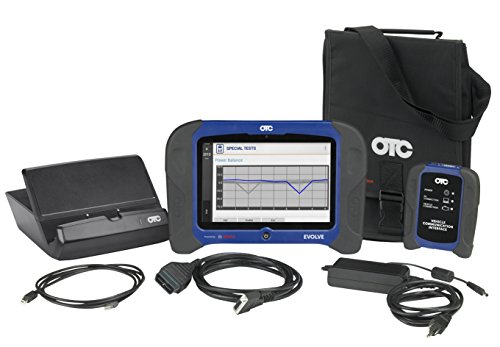
| Included Accessories | VCI, OBD2 cable, USB cable, docking station, power adapter, and carrying case |
These are the specifications associated with the original OTC Evolve platform. Vehicle coverage, software features, and online services depend on the software installed and whether the relevant services remain supported.
Because this model has been discontinued, buyers should verify those details directly with OTC before purchasing remaining stock or a used unit.

OTC has a long history of producing diagnostic equipment for automotive technicians. The Evolve 3896 was designed to offer deeper diagnostic access than many entry-level scan tools, including selected OBD1 vehicle coverage when the required optional cables were used.
However, supporting an older vehicle doesn’t mean that every system on that vehicle is accessible. Coverage depends on the vehicle, diagnostic protocol, software version, and available adapters.
The same applies to newer vehicles. An old professional scanner isn’t automatically compatible with every modern diagnostic system.
[toc]
OTC Evolve Review 2027: Features, Pros, Cons, and Buying Advice
Let’s take a closer look at what made the OTC Evolve 3896 popular among professional technicians and where it now has limitations.
Rugged Construction
When you’re working in a busy repair shop, durability matters. Scan tools are frequently moved between workstations, connected to different vehicles, and used around grease, dust, and other workshop conditions.
The OTC Evolve was built with a rugged tablet-style housing and a large optically bonded display.
The screen is designed to improve visibility and reduce reflections compared with conventional display construction. This can make it easier to read diagnostic information under different lighting conditions.
Its construction was a strong selling point when the scanner was introduced. However, as with any electronic diagnostic tool, the touchscreen, connectors, internal battery, and vehicle communication interface can develop problems over time.
If you’re buying a used OTC Evolve, inspect the screen, charging system, housing, ports, and VCI before deciding whether it’s worth the asking price.
Android Operating System
The OTC Evolve 3896 uses Android 5.0, which supported the diagnostic software and tablet functions when the device was originally released.
Combined with the Bravo software, Android helped provide an easier interface and faster navigation compared with some older diagnostic platforms.
Technicians could switch between diagnostic functions, view repair information, and work with different modules without relying on a conventional laptop.
However, Android 5.0 is now an outdated operating system. You shouldn’t expect it to offer the app compatibility, security updates, or performance of a current Android-based diagnostic tablet.
For workshop use, keep the device focused on its supported diagnostic applications. Avoid using an outdated Android tablet for sensitive personal accounts or general internet browsing.
Dual Wi-Fi Architecture
One feature that made the OTC Evolve stand out was its dual Wi-Fi design.
The scanner was built to maintain a dedicated wireless connection with the vehicle communication interface while also connecting to the workshop’s internet network.
This arrangement allows technicians to move around the vehicle while monitoring data or performing supported diagnostic tests.
It’s especially useful when you’re diagnosing problems that require you to inspect a component away from the driver’s seat.
However, the VCI still needs to be connected to the vehicle through the appropriate diagnostic connection.
Wireless communication between the tablet and VCI doesn’t eliminate the vehicle’s OBD2 connection.
If the scanner fails to communicate with a car, check the VCI, diagnostic cable, power supply, and vehicle compatibility before assuming the ECU has failed.
Our guide to OBD2 scanner connection problems explains common communication failures and what to check first.
Extensive Vehicle Coverage
Vehicle coverage was one of the strongest reasons to consider the OTC Evolve.
The scanner was originally advertised with diagnostic support for more than 25,000 vehicle systems and over 58,000 vehicle-ECU combinations.
It was designed to work with a broad selection of domestic, Asian, and European vehicles, including manufacturer-specific diagnostic functions beyond basic emissions-related OBD2 codes.
Depending on the vehicle and installed software, technicians could access engine, transmission, ABS, airbag, body, and other control modules.
The Evolve also supported selected older vehicles dating back to 1986 when the correct optional cables and software coverage were available.
However, don’t mistake that historical coverage range for a guarantee of compatibility with every vehicle from 1986 through 2027.
Modern vehicles may require CAN FD support, secure gateway authorization, or other manufacturer-specific communication capabilities.
Before using the OTC Evolve on a newer car, confirm that its installed software and hardware support the exact vehicle and diagnostic functions required.
Intuitive User Interface
The OTC Evolve features a 10.4-inch optically bonded touchscreen, which is large enough to make diagnostic information easier to read.
This is useful when viewing multiple sensor readings, comparing live data, or reviewing trouble code information.
The scanner also offers diagnostic assistance through functions such as Code-Assist, Repair-Trac, and Symptom-Assist.
These features were designed to help technicians move from a trouble code toward a more focused diagnostic procedure.
However, diagnostic codes don’t automatically identify the part that needs replacement.
For example, a misfire code can have several causes, including ignition, fuel delivery, compression, or air-fuel mixture problems.
If you’re learning to interpret vehicle fault codes, our car diagnostic trouble code guide provides additional information about common OBD2 codes.
Software Updates and Subscription Requirements
This is one of the most important things to understand before buying an OTC Evolve 3896 today.
The original package included a one-year diagnostic software subscription. During an active subscription, users could receive updated vehicle coverage and access supported subscription-based services.
OTC’s published product information explains that, after the subscription expires, the existing diagnostic vehicle coverage remains installed on the scanner.
However, users no longer receive new coverage updates, and the subscription-dependent wiring diagrams stop functioning.
That means the scanner doesn’t necessarily become unusable when the subscription expires, but its capabilities become more limited.
Now that the Evolve platform has been discontinued, you should not assume that new updates or subscription renewals remain available under the original conditions.
Before purchasing a used scanner, contact OTC and confirm what software, licensing, technical support, and repair services remain available for the exact serial number.
Backup Battery and Docking Station
The OTC Evolve includes a self-contained tablet with an internal power system, allowing technicians to review stored information away from the vehicle while the battery has sufficient charge.
The original kit also included a docking station and a carrying case for convenient charging and storage.
This arrangement was useful for busy repair shops where the diagnostic tool might be moved between workstations throughout the day.
However, battery condition is an important factor when buying a used device.
An older rechargeable battery may have reduced capacity or problems holding a charge.
Also, a tablet’s own battery power doesn’t replace the electrical power required by the vehicle or its diagnostic control modules.
Full-System Wiring Diagrams
One of the Evolve’s most useful professional features was access to wiring diagrams through Bosch repair information.
For complicated electrical problems, wiring diagrams can help technicians identify circuits, connectors, sensors, and control module connections.
They are especially valuable when dealing with communication faults, intermittent electrical problems, and wiring-related failures.
However, access to these diagrams was tied to the diagnostic software subscription and an active internet connection.
Once the subscription expired, the wiring diagram service was no longer available under the original terms.
Since the platform has been discontinued, it’s particularly important to confirm whether this service can still be activated or renewed.
Don’t buy an older Evolve specifically for Bosch wiring diagram access without checking its current availability first.
Wireless Connection
Wireless connectivity was a major advantage of the OTC Evolve when compared with many older scan tools.
The separate Wi-Fi link to the VCI allowed technicians to work around a vehicle without keeping the tablet physically attached to the OBD2 cable.
The scanner also included Bluetooth capabilities and a separate internet connection.
However, these connections serve different purposes. The diagnostic Wi-Fi connection, internet access, and Bluetooth features shouldn’t be treated as interchangeable.
If you want to understand the differences between common wireless diagnostic technologies, see our guide to Bluetooth vs. Wi-Fi OBD2 scanners.
Warranty and Manufacturer Support
The OTC Evolve was originally promoted through OTC’s Diagnostics for Life program, including a lifetime hardware warranty subject to the program’s terms.
The manufacturer’s description also tied ongoing support to keeping the diagnostic tool updated.
Because OTC discontinued the platform at the end of 2025, buyers should verify how the original warranty applies today.
In particular, check whether coverage is available to secondhand owners, whether repairs or replacement hardware are still supported, and whether software subscriptions are required for continued eligibility.
A seller’s claim of a lifetime warranty shouldn’t be treated as proof that a used scanner will receive unlimited support.
OTC Evolve 3896 Pros and Cons
Pros
- Professional diagnostic capabilities: Offers advanced system access beyond basic OBD2 code readers.
- Bi-directional controls: Supports numerous vehicle-dependent actuator tests.
- Large display: The 10.4-inch touchscreen is useful for viewing diagnostic information and live data.
- Wireless VCI: Lets technicians move around the vehicle during supported diagnostic procedures.
- Broad historical coverage: Originally designed for many domestic, Asian, and European vehicle systems.
- Repair information: Includes diagnostic assistance through Code-Assist, Repair-Trac, and related software features.
- Rugged construction: Built for use in an automotive workshop.
- Useful accessories: Original kit included a docking station, VCI, and carrying case.
Cons
- Discontinued platform: OTC officially discontinued Evolve on December 31, 2025.
- Outdated operating system: Android 5.0 is no longer a modern tablet platform.
- Update uncertainty: Buyers must verify whether software support and renewals are still available.
- Subscription-dependent information: Online wiring diagrams were not permanently included after subscription expiration.
- Modern vehicle limitations: Newer protocols and security systems may not be supported.
- High original purchase cost: Designed primarily for professional shops rather than occasional DIY use.
- Aging hardware: Used devices may have battery, screen, or VCI problems.
Is the OTC Evolve Still Worth Buying in 2027?
This is where I would be careful.
The OTC Evolve was a capable professional scanner when it was introduced, and an existing unit may still be useful for vehicles supported by its installed software.
For a repair shop that already owns the scanner, keeping it for familiar vehicles and supported diagnostic tasks can make sense.
However, I wouldn’t recommend buying it today as your primary diagnostic tool without checking several important details first.
The manufacturer has discontinued the platform, the operating system is old, and ongoing software support needs to be confirmed.
These limitations are especially important if your shop regularly works on newer vehicles.
What to Check Before Buying a Used OTC Evolve
- Confirm the exact model: Make sure the listing is for the OTC Evolve 3896 and not another OTC scanner.
- Check the installed software: Ask the seller to show the current diagnostic software version.
- Verify vehicle coverage: Confirm that it supports the makes, models, and functions you need.
- Check subscription eligibility: Contact OTC about remaining update and activation options.
- Inspect the VCI: Make sure the wireless vehicle communication interface is included and operational.
- Test the tablet: Check its screen, battery, charging system, and wireless communication.
- Confirm account ownership: Make sure any required registration or licensing can be transferred legitimately.
- Review accessories: Check that the cables, power adapter, docking station, and other necessary parts are included.
Don’t assume a low price automatically makes an old professional scanner a good deal. Missing software access or a defective VCI can quickly eliminate the savings.
OTC Evolve vs. OTC Encore
The OTC Evolve was positioned above the older OTC Encore in the company’s professional diagnostic lineup.
One of the noticeable differences is screen size. The Evolve features a 10.4-inch display, while the Encore uses a smaller 7-inch touchscreen.
The Evolve also emphasized expanded vehicle coverage, wireless VCI operation, repair information, and a more comprehensive professional diagnostic workflow.
For technicians who regularly diagnose different vehicle systems, these improvements made the Evolve attractive when both platforms were actively supported.
However, both products should now be evaluated in the context of their age, installed software, and remaining support.
If you’re interested in the older model, read our OTC Encore scanner review for a closer look at its original features.
OTC Evolve vs. Basic OBD2 Code Readers
There is a major difference between the OTC Evolve and a basic code reader.
A simple OBD2 scanner typically focuses on engine and emissions-related diagnostic information.
A professional scanner like the Evolve can access additional modules and perform more specialized testing on compatible vehicles.
For example, an advanced scanner may allow a technician to retrieve ABS codes, view manufacturer-specific data, or command a supported component during troubleshooting.
These capabilities help when diagnosing complicated problems that can’t be solved by reading a check engine light alone.
That said, a professional scanner doesn’t automatically tell you which part to replace. Proper diagnosis still requires testing, service information, and an understanding of the vehicle system.
If you only need basic fault code reading and emissions readiness checks, a simpler modern scanner may provide better value than an older professional tablet.
Better Alternatives to Consider
If you’re starting a repair shop or replacing an outdated diagnostic scanner, I would prioritize a model with current manufacturer support and clearly documented vehicle coverage.
Depending on your budget and the vehicles you work on, you may want to compare professional tools from Autel, Launch, Bosch, Snap-on, or other established diagnostic equipment manufacturers.
But don’t choose solely by brand name or the number of advertised service functions.
Check the actual diagnostic coverage for your workshop’s most common vehicles, including newer communication protocols and any required manufacturer-approved secure gateway access.
Our guide to professional automotive diagnostic scanners covers additional tools worth comparing.
You can also read our Autel MaxiSys Elite review to learn more about another advanced diagnostic platform.
Common OTC Evolve Problems and Troubleshooting
Scanner Won’t Connect to the Vehicle
Start by checking whether the vehicle communication interface is receiving power and is correctly connected to the diagnostic port.
Then check the tablet’s wireless connection to the VCI.
If the scanner works on one vehicle but not another, confirm that the second vehicle is supported by the installed software.
Don’t disconnect control modules or reset the vehicle’s computers simply because the scanner fails to connect.
OTC Evolve Runs Slowly
Older tablets may take longer to load diagnostic applications, especially when storage is nearly full or the battery is weak.
Close unnecessary applications, restart the scanner, and check for approved software maintenance instructions.
Since the device runs Android 5.0, some performance limitations are related to its original hardware and operating system.
Software Update Is Not Available
Check your internet connection and the diagnostic subscription status.
Because the platform was discontinued, contact OTC to find out whether the required software version or update service is still supported.
Avoid installing unofficial firmware or software files from unknown websites.
Wiring Diagrams Are Missing
Under the original OTC subscription policy, access to wiring diagrams required an active subscription and internet connection.
If the diagrams are unavailable, check the software entitlement and current service status.
Don’t assume the wiring information is permanently stored on the tablet.
Battery Doesn’t Hold a Charge
Aging rechargeable batteries can lose capacity over time.
Check the charger and docking station first. If the problem continues, contact a qualified service provider about approved repair options.
Do not attempt an improvised lithium battery repair.
OTC Evolve Review: Value for Money
When it was actively supported, the OTC Evolve offered an impressive combination of advanced diagnostics, repair information, and wireless operation.
Those features could save technicians time by helping them access multiple systems and perform targeted diagnostic procedures from one device.
However, value for money isn’t determined by the original feature list alone.
Today, buyers need to account for the scanner’s age, software availability, condition, remaining service support, and compatibility with newer vehicles.
A used unit might still provide value to someone who works primarily on older vehicles covered by the installed software.
For a shop that frequently diagnoses newer cars, investing in a currently supported diagnostic platform is generally the safer long-term decision.
User Experience and Performance
The OTC Evolve’s large touchscreen and dedicated wireless VCI were designed to make everyday diagnostics easier.
Its interface allowed technicians to access trouble codes, live data, repair information, and active tests from a single system.
The large display can be particularly helpful when comparing several live-data values or reviewing diagnostic information.
The wireless design also makes it more convenient to move around a vehicle while monitoring supported components.
However, performance depends on the condition of the individual device and its installed software.
An older scanner with worn hardware or outdated diagnostic coverage may not provide the same experience as it did when new.
For that reason, anyone considering a used OTC Evolve should test its actual diagnostic functions rather than relying only on the seller’s description.
Conclusion: Is the OTC Evolve 3896 Still a Good Scanner?
The OTC Evolve 3896 was an impressive professional diagnostic scanner for its time. It brought together extensive vehicle coverage, bi-directional controls, repair information, a large touchscreen, and wireless diagnostic communication.
These features made it a useful tool for technicians who needed deeper diagnostic access than a basic OBD2 reader could provide.
However, the situation has changed. OTC discontinued the Evolve platform on December 31, 2025, and its Android 5.0 operating system is now outdated.
If you already own an OTC Evolve and it supports the vehicles you work on, it may still be worth keeping as a secondary or dedicated diagnostic tool.
But if you’re purchasing a professional scanner for a busy repair shop today, I would compare currently supported models before buying an older Evolve.
Be especially careful about software subscriptions, account eligibility, vehicle coverage, and the condition of used equipment.
I hope this OTC Evolve review helps you understand what the 3896 scanner offers, what has changed, and whether it still makes sense for your diagnostic needs.
Frequently Asked Questions About the OTC Evolve 3896
1. Is the OTC Evolve 3896 discontinued?
Yes. OTC officially discontinued the Evolve diagnostic platform on December 31, 2025. Existing units may still perform supported diagnostic functions, but current software support and service availability should be confirmed with OTC.
2. Which vehicles does the OTC Evolve support?
The OTC Evolve was designed for a broad range of domestic, Asian, and European vehicles. It also offered selected older OBD1 coverage with optional cables. Exact compatibility depends on the vehicle, installed diagnostic software, and supported functions.
3. Can I use the OTC Evolve after the software subscription expires?
Under OTC’s original subscription terms, previously installed vehicle coverage remained available after the subscription expired. However, new coverage updates were no longer provided, and subscription-dependent wiring diagrams stopped functioning.
4. Does the OTC Evolve support bi-directional control?
Yes. The scanner was advertised with thousands of actuator and adjustment tests. However, individual tests depend on the vehicle make, model, year, control module, and installed software coverage.
5. Does the OTC Evolve include free lifetime software updates?
No. The original scanner included a one-year diagnostic subscription. Additional coverage updates required renewal under the manufacturer’s program. With the platform now discontinued, buyers should confirm whether renewals or additional software support remain available.
6. Is the OTC Evolve worth buying in 2027?
It may still be useful for someone working on older vehicles supported by its installed software. However, because the platform is discontinued and uses outdated hardware and software, a currently supported diagnostic scanner is generally a better choice for professional shops working on newer vehicles.

Kevin Nicholas is an automotive mechanic and editor of The Effective Guide. He writes about warning lights, car problems, and diagnostic tools, helping drivers understand what to check before replacing a part.