
Last Updated on October 11, 2026
The Actron CP9680 AutoScanner Plus was designed for car owners who wanted more information than a basic Check Engine Light code reader could provide. Along with engine diagnostics, it offered live-data graphing, CodeConnect repair information, and selected ABS and airbag coverage.
These features made it useful for DIY mechanics who preferred diagnosing a problem before replacing expensive parts. Its color screen and straightforward menus also made everyday troubleshooting easier.
However, there’s an important update. The Actron CP9680 has been discontinued, and software updates are no longer available. Existing units may continue working with compatible vehicles, but buyers should not expect support for newer vehicle systems.
In this Actron CP9680 review, we’ll examine its original features, specifications, diagnostic capabilities, limitations, and whether it’s still worth buying. If you’re considering a newer scanner, our Innova 5210 review covers another option for everyday vehicle diagnostics.
Actron CP9680 Review: Features at a Glance
- Color LCD with English, Spanish, and French menus.
- Read and erase supported engine trouble codes.
- Record, play back, and graph live engine data.
- Retrieve freeze-frame information and check emissions readiness.
- CodeConnect troubleshooting information.
- Selected ABS and SRS airbag diagnostic coverage.
- Oil-light and battery reset functions on supported vehicles.
- Battery and charging-system monitoring.
- USB connection for supported PC functions.
The CP9680 was intended mainly for OBD2 diagnostics. Some early OBD2-compliant vehicles from 1994 and 1995 may be supported, but compatibility isn’t universal.
Current status: Actron lists FED0 and/or 0B0B as the final software versions. The tool is no longer receiving software updates.
Check Third-Party Availability
Technical Specifications of the Actron CP9680 AutoScanner Plus
Here’s a closer look at the scanner’s main specifications and diagnostic functions.
| Features | Actron CP9680 AutoScanner Plus |
| Scanner Type | Handheld OBD2 diagnostic scan tool |
| Vehicle Compatibility | Supported OBD2 vehicles, including many 1996-and-newer models |
| Display | Color LCD |
| Languages | English, Spanish, French |
| Read and Erase DTCs | Yes |
| OEM-Specific Codes | Selected supported applications |
| ABS and SRS Coverage | Selected makes and model years |
| Live Engine Data | Yes, with graphing and recording |
| Freeze-Frame Data | Yes, when available |
| I/M Readiness | Yes |
| CodeConnect | Yes |
| Battery System Monitor | Yes |
| Oil-Light Reset | Supported vehicles only |
| Battery Reset | Supported vehicles only |
| Transmission Diagnostics | Limited vehicle-dependent coverage |
| PC Connection | USB-supported functions |
| Software Status | Discontinued; updates unavailable |
| Final Software Version | FED0 and/or 0B0B |
| Availability |  Check Availability |
[toc]
Why Choose the Actron CP9680 AutoScanner Plus?
1. Read and Clear Engine Trouble Codes
The CP9680 retrieves supported diagnostic trouble codes stored by the vehicle’s computer. This can help identify problems involving the engine, emissions equipment, and other monitored powertrain components.
After completing repairs, users can erase supported codes and check whether they return. However, clearing a code doesn’t repair a failed component.
If you’re unsure what a stored code means, refer to our OBD2 trouble code guide before deciding which parts need testing.
2. Live Data and Graphical Display
Live data was one of the CP9680’s most useful features. Instead of seeing only a trouble code, you could monitor supported engine parameters while the vehicle operated.
Depending on the vehicle, available readings could include engine RPM, coolant temperature, throttle position, oxygen sensor information, and fuel trims.
Graphing and recording functions helped users examine changing readings, particularly when investigating intermittent problems.
 Check Third-Party Availability
3. ABS and Airbag Diagnostics
Unlike simple engine-code readers, the CP9680 offered selected ABS and SRS airbag diagnostic functions.
This could be useful when an ABS warning light or airbag warning light appeared on a supported vehicle.
However, these functions depended on the vehicle’s manufacturer and model year. The CP9680 was not a universal ABS and SRS scanner.
Also, retrieving an airbag trouble code doesn’t mean the system is safe to repair without proper training. Airbag components require specific safety procedures.
4. CodeConnect Repair Information
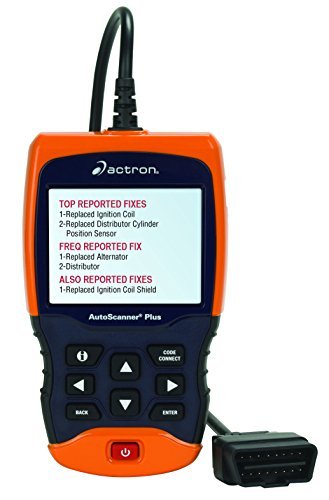
CodeConnect was another standout feature. It provided troubleshooting information and commonly reported repairs related to certain diagnostic trouble codes.
For a beginner, this could help identify which components deserved attention first.
However, a suggested repair isn’t confirmation that a particular part is defective. Wiring, connectors, or related components should still be tested before replacement.
5. Oil-Light and Battery Reset Functions
The Actron CP9680 included selected maintenance functions, including oil-light and battery reset capabilities.
The oil-light reset function could reset oil-life information on compatible vehicles following service.
The battery reset function could inform supported vehicle charging systems that a battery had been replaced.
Important: These functions appeared only when the selected vehicle supported them. The CP9680 could not perform every oil or battery reset procedure across all manufacturers.
6. Color Screen and Trilingual Menu
The scanner’s color LCD made it easier to review trouble codes and diagnostic readings than on smaller monochrome devices.
Its English, Spanish, and French menus also made navigation accessible to more users.
Some repair descriptions and technical information could still appear in English.
7. Battery and Charging-System Monitoring
The CP9680 included battery and charging-system monitoring functions that could help users check basic electrical-system conditions.
However, these functions shouldn’t be confused with a comprehensive battery capacity test or a professional charging-system diagnosis.
Additional electrical testing may still be necessary when diagnosing intermittent battery or alternator problems.
8. Portable Construction
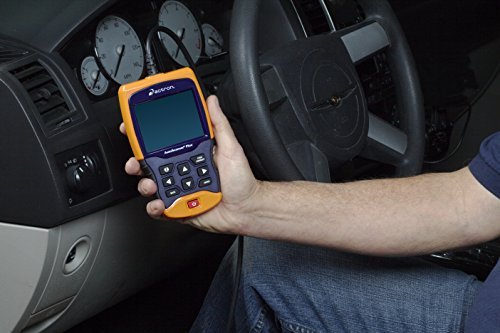
The handheld design made the scanner convenient to store and use around a garage.
Its plastic housing was intended for normal workshop use, although buyers of secondhand units should inspect the display, buttons, and cable for damage.
How to Use the Actron CP9680 Scanner
Basic engine-code reading is straightforward once the tool is connected to a compatible vehicle.
- Park the vehicle safely and switch off the ignition.
- Locate the 16-pin OBD2 diagnostic port, usually beneath the dashboard.
- Connect the CP9680 securely.
- Turn the ignition on and follow the screen instructions.
- Select the appropriate diagnostic menu and retrieve stored or pending codes.
- Record the codes and available freeze-frame information.
- Use live data or supported tests to investigate the fault.
- Clear codes only after completing the necessary repairs.
Clearing engine codes may also reset emissions readiness monitors, so avoid doing this immediately before an emissions inspection.
Actron CP9680 Troubleshooting Guide
If your scanner isn’t working as expected, check the following common problems.
| Problem | Possible Cause | What to Check |
|---|---|---|
| Scanner won’t power on | Connection or power supply issue | Inspect the diagnostic connector, vehicle battery, and applicable fuse. |
| Cannot communicate with vehicle | Ignition off, incompatible vehicle, or connection fault | Check ignition position, cable connection, and vehicle compatibility. |
| No codes displayed | No stored code or incorrect system selected | Check pending codes and verify the diagnostic system. |
| Live data unavailable | Unsupported parameter or communication problem | Confirm available vehicle parameters and reconnect if necessary. |
| Display freezes | Temporary communication or hardware issue | Disconnect safely and restart the scanner. |
| Codes won’t clear | Active fault or incorrect procedure | Repair the underlying issue and follow the erase-code instructions. |
| ABS or SRS menu unavailable | Unsupported vehicle application | Check the original enhanced coverage information. |
| Newer vehicle not supported | Legacy software coverage | Check the installed software version; no new updates are available. |
If communication problems continue, our OBD2 scanner not linking guide explains additional checks.
Disadvantages of the Actron CP9680
Despite its original features, the CP9680 has several limitations today.
- Discontinued Product: Actron no longer supplies new software updates.
- Limited Newer-Vehicle Coverage: Enhanced diagnostics may not work on recent vehicles.
- Vehicle-Specific Functions: ABS, SRS, battery reset, and service functions aren’t universally available.
- Older Interface: Its wired connection and menu design may feel dated.
- Used Product Risks: Remaining units may have worn cables, damaged buttons, or missing accessories.
The scanner can still be useful for compatible vehicles, but its discontinued status makes it less attractive as a new purchase.
Actron CP9680 vs. CP9690: Comparison Table
The main difference is that the CP9690 Elite offered OBD1 diagnostic support for selected older vehicles, while the CP9680 focused primarily on OBD2.
| Feature | Actron CP9680 | Actron CP9690 |
|---|---|---|
| Standard OBD2 Diagnostics | Yes | Yes |
| Selected OBD1 Coverage | No dedicated OBD1 kit | Yes, with suitable accessories |
| Color Display | Yes | Yes |
| Live Engine Data | Yes | Yes |
| Data Graphing | Yes | Yes |
| Freeze-Frame Data | Yes | Yes |
| CodeConnect | Yes | Yes |
| ABS/SRS Coverage | Selected vehicles | Selected vehicles |
| Maintenance Functions | Selected applications | Selected applications |
| Software Support | Discontinued | Discontinued |
| Best For | Compatible OBD2 vehicles | Owners of selected OBD1 and OBD2 vehicles |
If you maintain an older pre-1996 vehicle, the Actron CP9690 Elite scanner may be more useful, provided its OBD1 accessories and supported vehicle coverage match your needs.
Is the Actron CP9680 Still Worth Buying?
If you already own a functioning CP9680 and it communicates correctly with your vehicle, it may still be worth keeping.
However, buying a used CP9680 requires extra care. Before purchasing, check the installed software version, compatible vehicle list, accessories, and physical condition.
Actron’s official CP9680 software information confirms that FED0 and/or 0B0B are the final listed versions and that updates are no longer available.
For new purchases, consider a currently supported diagnostic scanner instead. A modern tool may offer better compatibility with newer vehicles and more accessible software support.
Best Alternative to the Actron CP9680
The Innova 5210 is one alternative to investigate if you want a modern scanner for engine codes, live data, and supported enhanced diagnostics.
However, it isn’t a direct replacement for every CP9680 function. Check ABS, SRS, oil reset, battery reset, and other system coverage for your particular vehicle before buying.
If you need more extensive service functions, compare scanners with verified manufacturer-specific capabilities rather than relying only on a product’s OBD2 compatibility statement.
Frequently Asked Questions About the Actron CP9680
1. Is the Actron CP9680 discontinued?
Yes. Actron has discontinued the CP9680 AutoScanner Plus. Its official product information confirms that new software updates are no longer available.
2. What vehicles are compatible with the Actron CP9680?
The CP9680 supports many OBD2-compliant vehicles, including numerous 1996-and-newer models. However, enhanced diagnostic coverage varies by manufacturer, model year, and installed software.
3. Can the Actron CP9680 read ABS and airbag codes?
Yes, on selected compatible vehicles. The CP9680 isn’t a universal ABS or SRS scanner, so its supported vehicle applications should be checked before purchase.
4. Does the Actron CP9680 support live data?
Yes. It can display, record, and graph supported engine data, including available parameters such as RPM, coolant temperature, and fuel system information.
5. Can I update the Actron CP9680 software?
No new updates are available. Actron lists FED0 and/or 0B0B as the final software versions for this discontinued model.
6. Should I buy a used Actron CP9680?
It may be worthwhile if the scanner is functional, inexpensive, and confirmed compatible with your vehicle. Otherwise, a currently supported diagnostic tool is generally a better long-term choice.
Final Verdict: Actron CP9680 Review
The Actron CP9680 was a capable diagnostic scanner with useful features such as live-data graphing, CodeConnect, selected ABS and airbag diagnostics, and maintenance reset functions.
Its color display and trilingual interface also made it approachable for DIY car owners.
However, the scanner’s discontinued status limits its appeal today. Existing units can continue performing supported functions, but software compatibility with newer vehicles cannot be assumed.
If you already own a CP9680, there’s no reason to replace it simply because it’s discontinued. If you’re purchasing your first diagnostic scanner, a currently supported model with verified vehicle coverage is usually the more sensible investment.
 Check Third-Party Availability
Affiliate Disclosure: This page may contain Amazon affiliate links. We may earn a commission from qualifying purchases at no additional cost to you.
Kevin Nicholas is an automotive mechanic and editor of The Effective Guide. He writes about warning lights, car problems, and diagnostic tools, helping drivers understand what to check before replacing a part.
1 thought on “Actron CP9680 Review 2027: AutoScanner Plus SRS/ABS/Airbag scan tool”
I have a 2003 chevy truck I pluged scanner in and nothing shows up on screen