
Last Updated on August 14, 2025
Maintaining a car used to feel like a mystery to me. I’d always assume that if the check engine light came on, it meant an expensive trip to the mechanic. But over time, I realized that basic maintenance and quick diagnostics can save a lot of money and headaches — if you have the right tools. That realization led me to purchase the Innova 5310 OBD2 scanner.
In this Innova 5310 review, we take a close look at how this versatile OBD2 scanner performs in real-world diagnostic situations. I’ll share my personal experience after using it for several months — why I chose it, how it performs in real situations, its features, its pros and cons, and whether I would recommend it to someone like you. If you’re thinking about getting a budget-friendly, beginner-friendly scanner, I hope my story will help you make an informed decision.
Innova offers a full range of OBD2 scanners to suit every need — from the budget-friendly Innova 5110 and 5210 to the feature-rich Innova 5510, 5410, 5310, and the top-tier Innova 5610 for advanced diagnostics.
Why I Chose the Innova 5310?
When I first started shopping for an OBD2 scanner, I was overwhelmed. There are hundreds of models available, ranging from cheap $20 code readers to $500+ professional devices. I knew I didn’t need anything too complicated. My needs were pretty straightforward:
- Read and clear check engine light codes
- View live data to monitor the car’s performance
- Check for common issues like ABS and SRS problems
- Reset basic maintenance lights after oil changes
- Find something durable, easy to use, and reasonably priced
I had heard about Innova from a friend who swore by their scanners, so I focused my search there. After comparing several models, the Innova 5310 stood out because it offered just the right balance: enough advanced features without being overwhelming, all at an affordable price.
 Check Quick Overview & Today’s Price on Amazon
Another big factor? Trust. Innova is known for producing quality products that are widely used by DIYers and even some professional mechanics. I wanted a tool that I could rely on, and Innova’s reputation gave me peace of mind.
Looking for an honest Innova 5310 review? This powerful OBD2 scanner promises pro-level diagnostics at a beginner-friendly price. But does it really deliver what your car needs?
Unboxing and First Impressions
When the Innova 5310 arrived, I was excited to dig in. Here’s what was included in the box:
- The scanner itself
- A user manual
- A quick-start guide
- A USB cable for software updates
Right away, I noticed the solid construction. The device feels sturdy in hand — not too heavy, but heavy enough to feel durable. The design is practical, with a rubberized grip around the edges to prevent slipping.
The 2.8-inch color screen was another pleasant surprise. It’s crisp, colorful, and large enough to easily read all information without squinting. Many scanners around this price range still have black-and-white screens or tiny displays, so the color screen felt like a luxury.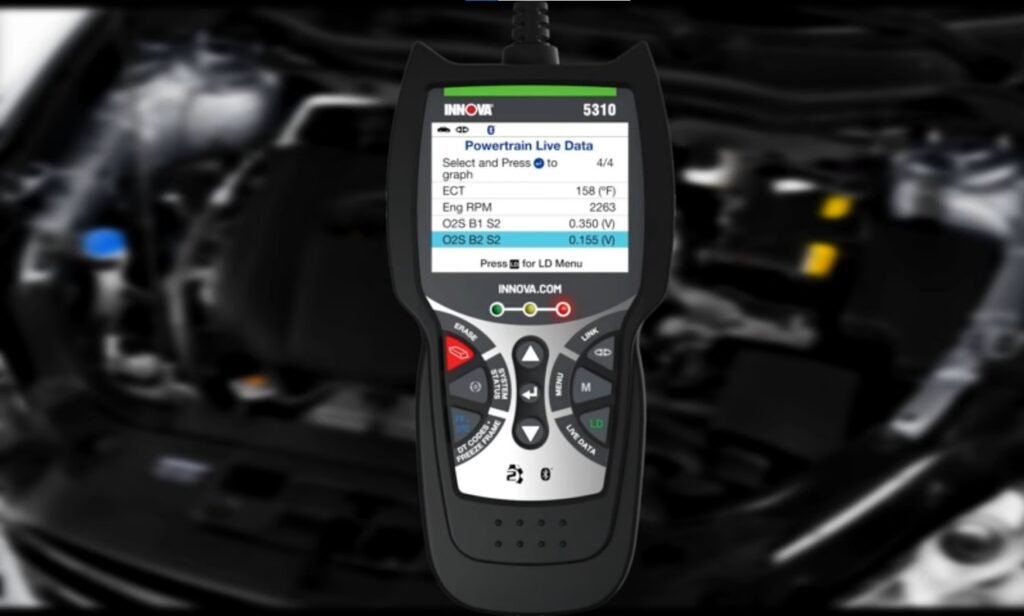
I also liked the cable length — about 3 feet long — which is plenty of space for me to plug it into my car’s OBD2 port and sit comfortably while using it.
Overall, the first impression was professional and user-friendly — exactly what I had hoped for.
Setting Up the Innova 5310
Setting up the scanner was refreshingly simple, even for someone not very tech-savvy.
Here’s what I did:
- Locate the OBD2 Port: In most cars (including mine), it’s under the dashboard near the steering wheel.
- Plug in the Scanner: Once plugged in, the Innova 5310 automatically powered on — no batteries or separate power supply needed.
- Turn on the Ignition: I turned the key to the “ON” position without starting the engine.
- Wait for Connection: Within seconds, the scanner connected to the car’s computer.
From plugging it in to reading codes, the entire process took less than two minutes. The interface is extremely easy to navigate. The menus are simple, with large buttons and clear labels like “Read Codes,” “Erase Codes,” and “Live Data.” There’s even an on-screen guide if you’re unsure what to do next.
For me, this was a big win. I didn’t have to watch YouTube tutorials or search for setup instructions — it just worked.
Innova 5310 Review: Reliable Diagnostics on a Budget
The Innova 5310 is a compact, user-friendly OBD2 scanner designed for everyday drivers and DIY mechanics. With essential features like live data and freeze frame support, it offers solid value without overwhelming complexity. In this Innova 5310 review, we’ll explore how it performs under real-world conditions and whether it’s the right tool for your garage.
Features That Impressed Me
One of the things I love about the Innova 5310 is how feature-rich it is for a scanner in this price range. Here are the standout features I personally found most useful:
1. Reading and Clearing Check Engine Codes
The most basic (but crucial) function — and it works flawlessly. It not only pulls the diagnostic trouble codes (DTCs) but also gives a short description.
For example, instead of just saying “P0138,” it told me, “O2 Sensor Circuit High Voltage (Bank 1 Sensor 2).” That saved me the trouble of looking up codes online every time.
2. ABS and SRS Diagnostics
When my wife’s car had the ABS warning light come on, the Innova 5310 detected it immediately.
Not all entry-level scanners can pull ABS or airbag codes — many cheaper models only read engine codes.
Having this feature alone saved us a trip to the mechanic, probably costing $100+ just for a diagnostic.
3. Live Data Streaming
I didn’t expect to use this feature much at first, but now I use it all the time.
You can watch real-time data like:
- RPM
- Coolant temperature
- Fuel trims
- Oxygen sensor readings
- Vehicle speed
It’s fascinating (and incredibly useful) to monitor how your car behaves while idling, accelerating, or coasting. It also helped me diagnose a small vacuum leak I didn’t even know existed.
4. Oil Light Reset
After changing my oil, I used the Innova 5310 to reset the oil maintenance light.
This was another area where it was super user-friendly — clear instructions, quick execution, and no dealership visit needed.
5. Battery and Charging System Check
Another handy feature I didn’t expect: the scanner can check your battery health and alternator performance.
When my car had trouble starting one morning, I used the 5310 to quickly test the battery. Turned out the battery was fine — it was just a loose terminal connection. Again, it saved me a trip to the shop.
6. Smog Test Readiness
Before my state’s emissions test, I used the “Readiness Monitors” feature to check if my car would pass. The scanner told me everything was ready, and sure enough, the car passed the test.
This alone saved me from making a trip to the DMV and finding out there was a problem.
User Experience in Different Situations
Diagnosing an Engine Light
The first real-world test came when my car’s check engine light appeared out of nowhere.
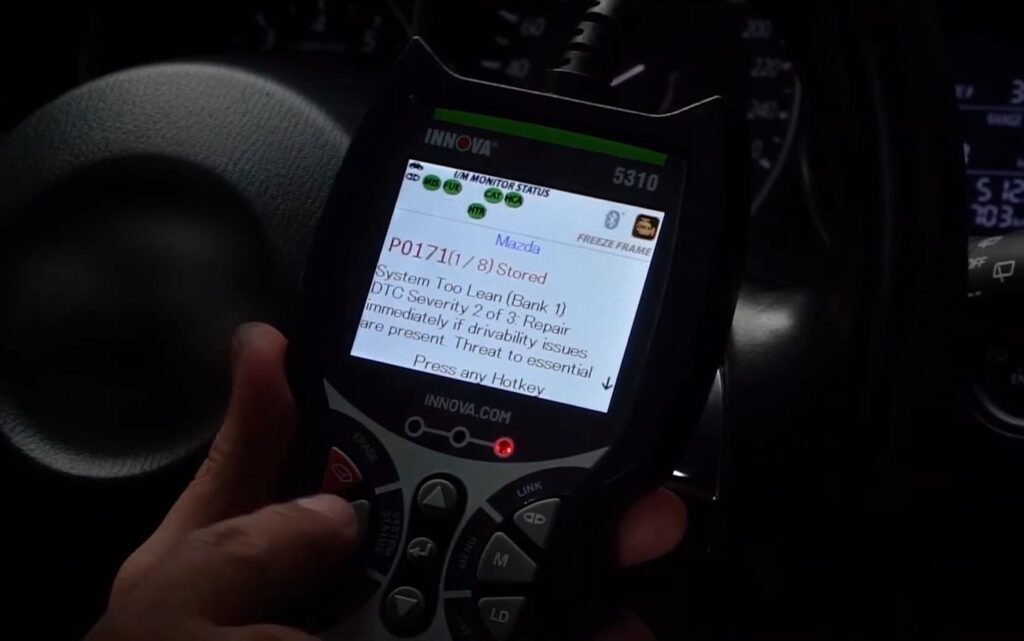
I plugged in the scanner, selected “Read Codes,” and within seconds, it displayed a P0171 (System Too Lean) error. The scanner also provided possible causes, such as a vacuum leak, dirty MAF sensor, or low fuel pressure.
Armed with this information, I was able to clean my MAF sensor (a simple DIY fix) and reset the code. The light stayed off — problem solved.
Helping Friends and Family
Since getting the Innova 5310, I’ve used it to help friends and family too.
One friend had an airbag light on in her Honda Civic. Another had a rough idling issue. In both cases, I was able to quickly read the trouble codes, interpret the results, and suggest next steps.
It feels good to help others — and it’s kind of fun being the “car doctor” in my circle now!
A Few Things I Didn’t Love
Even though I’m very happy with the Innova 5310, it’s only fair to mention the limitations too:
1. Not Bi-Directional
Some advanced scanners let you actively test components — like forcing the fuel pump on or cycling the ABS solenoids.
The Innova 5310 is read-only, meaning you can monitor and reset things but can’t control vehicle components manually.
For DIY users like me, this isn’t a deal-breaker. But if you’re a professional mechanic, you might need something more advanced.
2. Limited Advanced Resets
While it can reset oil and battery maintenance lights, it doesn’t support things like:
- TPMS sensor relearns
- Steering angle sensor calibration
- Throttle body relearning
Again, I didn’t really expect these features at this price, but it’s something to keep in mind.
3. Software Update Process
To update the device, you need to download Innova’s RepairSolutions2 software onto your computer.
While it worked fine, the interface feels a little outdated compared to modern apps. I had to fiddle around a bit to get the first update done.
Still, it’s great that updates are available — it keeps the tool current with newer vehicles.
Value for Money
I paid around $120 for my Innova 5310, and considering how much I’ve saved already, it’s a no-brainer investment.
Here’s a quick breakdown:
| Service | Cost at Mechanic | Cost with Innova 5310 |
|---|---|---|
| Check engine light diagnosis | $100+ | Free |
| ABS diagnosis | $100+ | Free |
| Battery and alternator test | $30–$50 | Free |
| Oil light reset | $30 | Free |
In just a few uses, the scanner paid for itself — and it continues to save me money every time something comes up.
Who Should Buy the Innova 5310?
I believe the Innova 5310 is perfect for:
✅ DIY car owners who want to perform basic maintenance
✅ Beginners who need an easy-to-use scanner
✅ Anyone who wants to save money on diagnostic fees
✅ People who want a mid-range scanner without paying professional-level prices
However, it may not be ideal for:
❌ Full-time professional mechanics who need bi-directional controls
❌ Users who need advanced reset features for TPMS, SAS, etc.
If you fall into the first group — casual car owners who want more control over vehicle maintenance — the Innova 5310 is an excellent choice.
Final Verdict: My Honest Thoughts on Innova 5310 review
After several months of real-world use, I can confidently say that buying the Innova 5310 was one of the best decisions I’ve made for my car maintenance routine. After testing its features and usability, our Innova 5310 review confirms it’s a reliable tool for DIYers and car enthusiasts looking for accurate, user-friendly diagnostics.
It’s accurate, dependable, easy to use, and packed with enough features to handle everyday issues without overwhelming you with unnecessary complexity. Whether you’re just starting your DIY journey or simply want a reliable tool to save time and money, the Innova 5310 delivers excellent value.
Would I recommend it?
Absolutely. In fact, I already have — to friends, family, and now to you.
If you’re looking for a trustworthy, affordable, and user-friendly OBD2 scanner, the Innova 5310 deserves a spot at the top of your list.
Still have questions after reading this Innova 5310 Review? Comment below.

Kevin Nicholas is an automotive technician who is a genius at software and hardware-related issues. He manually tested more than a hundred OBD scanners and gave his honest opinion on whether the device was worth the money or not. His in-depth OBD review articles help people choose the right product, whether it is a European, American, or Asian vehicle. He completed his Automotive Specialized Training Course at Universal Technical Institute and has more than 15 years of experience in the field.